Calling innovation hubs
NIPOST, working with ONDI, invites innovation hubs to apply for access to the Digital Postcode API and access tokens. Read more here
Someone is coming to your home and sends a familiar message: “Please send me your location.”
You could type your address, add the nearest landmark, and explain which turn to take. But if the person simply needs a standard reference for your building, you can share its digital postcode instead.
Nigeria’s Digital Postcode is an 11-character code associated with a specific addressable building or location. It gives that place a consistent digital reference that people and systems can use.
Once you find a postcode in the Postcode app, you can share it immediately or save it for later. Here’s how.
You do not have to save a postcode before you can share it.
Open the Postcode app and find the location you want to share. You can search for a postcode or alias, or use Find my postcode to locate the postcode for your location.
If you use Find my postcode, the app locates you on the map. Tap the correct building to get its postcode. This step matters because the postcode is associated with the building, not with the individual using the app.
Once the postcode appears:
The recipient gets the postcode as a standard reference for that location.
Think about the places whose locations you share regularly: your home, office, a family member’s house or another place you visit often.
Searching for the same postcode every time would get repetitive. Instead, the app lets you save frequently used postcodes and return to them when you need them.
When saving a postcode, you can add a label such as Home or Office to make it easier to recognise later. You can also choose one saved location as your primary postcode.
To share one you’ve already saved:
You can also tap Copy if you only want to copy the postcode and paste it somewhere yourself.
Sharing a postcode is useful whenever another person or organisation needs a consistent reference for a physical location.
For example, imagine a friend is visiting your home for the first time. Instead of relying only on “turn after the filling station” or another landmark that could be misunderstood, you can send the postcode associated with your building.
You could also share a postcode when giving someone your office location, specifying a delivery destination, sending the location of a family member’s home, or providing location information as part of a service or transaction.
A postcode belongs to the location or building. If you move to another building, you use the postcode associated with your new location.
Not always.
A digital postcode identifies the location. There may still be situations where the person coming to you needs more instructions about how to access it.
For example, “Use Gate B” tells a visitor what to do when they arrive. The postcode and the instruction perform different jobs: the postcode identifies the location, while the extra instruction explains how to access or interact with it.
The same distinction applies to navigation. A postcode provides the location reference, while mapping and navigation tools can help someone work out how to get there.
Yes, if you have the postcode for the location you need to share.
The Postcode app isn’t limited to your home or current location. You can discover other places, view their postcodes, and save places you use regularly.
For example, suppose someone asks you for the postcode of your parents’ house. You can find the correct building in the app and share its postcode. If it’s somewhere you reference regularly, save it with a label such as Parents’ House so it’s easier to find next time.
Remember that the postcode identifies the physical location. It doesn’t identify the people who live there.
You don’t have to use the Share button. When the app displays a postcode, you can tap Copy instead. You can then paste the code into a message, form, note, or another place where you need it.
The same Copy option is available for saved postcodes.
This can be useful when another app or service specifically asks you to enter a postcode rather than share it through your phone’s sharing menu.
The next time someone asks you to “send your location,” you have another option besides typing directions from scratch.
Find the correct building’s digital postcode and tap Share. And if it’s a place you expect to use again, save it with a recognisable label so it’s ready the next time you need it.
Open the Postcode app, find the postcode you need, and share it.
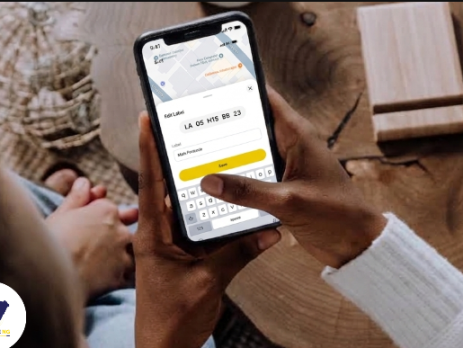
Finding your digital postcode takes a few simple steps. Open the Postcode app, tap Find My Postcode, identify your building on the map, and tap it to see its postcode.
Selecting the correct building matters because your digital postcode is associated with a specific addressable building or location. Two buildings can stand beside each other and have different building-level postcodes.
This guide shows you how to find your building, confirm its postcode, and handle situations where your building is missing or its information needs to be updated.
Open the Postcode app and tap Find My Postcode.
The app uses your device's current location to find your general area. You may need to allow location access for this feature to work.
Once your location is found, the app displays an overhead map of the area around you.
Look at the buildings displayed around your location.
Several buildings may appear close together, especially on streets with many houses, inside estates, or in areas with shops and offices.
Use the position of nearby buildings and roads to work out which building is yours. Compare what you see on the map with what you know about your surroundings.
For example, your building may be:
These details can help you select the correct building.
Tap the building once you have identified it on the map. This step gives you the postcode associated with that specific building.
Before you select a building, the map helps you identify the buildings around your location. Tapping your building reveals the complete postcode you need for that location.
A simple way to remember the process is: Your location gets you to the right area. Selecting your building gets you the right postcode.
Check the selected building on the map before using the postcode. Your digital postcode identifies a specific mapped building or location. A postcode from the building next door points to that building, even when both buildings share the same street, estate, or immediate surroundings.
For example, Ada lives in a row of four houses. She opens Find My Postcode and sees the four buildings on the map. She uses their positions to identify her house and taps it. The postcode displayed after her selection is the one associated with that building.
Take a few seconds to confirm your selection before moving on.
Once you have confirmed the correct building, you can use the postcode displayed by the app.
Depending on what you need to do, you can copy the postcode, save it for future use, or share it with someone else.
Saving frequently used postcodes can also make them easier to find later. You can save locations such as your home, office, family home, warehouse, or other places you use regularly.
Search carefully for your building first. Most validated existing buildings are expected to already have an assigned postcode.
A new or missing building needs to go through the approved process for adding the building and assigning its postcode.
Use that process when your actual building is unavailable on the map. This ensures you eventually receive the postcode associated with the correct location. You can read the request postcode guide for more details.
Use the approved suggestion process when information about a location needs to be updated.
Provide the information that needs to be changed and what it should say instead. The submitted information can then be reviewed before any changes are made.
This helps keep the postcode associated with the correct mapped location.
You have the right postcode when you have identified and selected the correct building on the map.
Remember these five steps:
Your digital postcode gives you a standard reference for a specific location. Taking a moment to identify the right building helps ensure that the postcode you use points to the place you actually mean.
Your postcode is the digital address of your home or business. Couriers use it to find you. Emergency responders use it to reach you. Banks, delivery apps and government agencies use it to confirm where you are.
When the details tied to your postcode are wrong, people lose time. A rider goes to the wrong street. A record shows a bungalow where a two-storey building stands. A shop is listed as a home. These errors are easy to fix.
The Find a Postcode tool lets you suggest corrections straight from your phone. The submission takes about two minutes. NIPOST then reviews your request and completes the process within 48 hours. This guide walks you through every step.
Every postcode page has an Edit option. It opens a screen called Suggest Edit. You can suggest changes to five details.
You can change one detail or all five in a single visit.
Open the app on your phone. The home screen shows a Find Postcode button and a list of your recent searches. Tap the Search tab at the bottom of the screen to open the map view.
Tap the search bar at the top. It reads "Search postcode, place or alias." Type your full postcode. You can also tap Paste if you copied it from a message, or tap Scan Text to read it from a document.
Postcodes follow a pattern of letters and numbers in groups. Enter every group in the right order. When your postcode appears in the bar, tap the Look up button beneath it.
The map moves to your building. A card slides up from the bottom of the screen. It shows your postcode, a yellow verified badge, the building use, the structure type and the full address.
Read each line slowly. Compare it with the real building. Look at the street name, the house number, the number of floors, and what the building is used for. Anything that differs from reality needs a correction.
Under the address you will see four buttons. They are Directions, Share, Save and Edit.
Tap Edit to open the Suggest Edit screen. The five options appear in a list. Choose the detail you want to fix. A row of tabs at the top of the next screen lets you move between the details without going back.
Each detail follows the same pattern. The screen shows the current information with a green tick. Below it is a field for the new information.
Address. Type the correct address in the Suggest New Address field. Use the full form with house number, street, area and city.
Structure type. Tap the dropdown and pick the option that fits your building. The choices are Bungalow, Traditional hut, 1-Storey, 2-Storey, 3-Storey, More than 3 storey, Uncompleted/Unroofed, Dilapidated, Shed/Silo, Temporary container and Permanent container.
Building use. Choose from residential, commercial, institutional, mixed or unknown. Pick mixed when one building serves more than one purpose, such as a shop on the ground floor with flats above.
Ownership. Choose Government, Private Ownership, or Private Agency/Group/Family.
Photos. Tap Add and upload a photo of the building. A clear picture of the front of the building helps the review team confirm your suggestion.
The Submit button starts grey. It turns yellow once you make a change. A small yellow dot also appears on each tab where you have made edits. This helps you track which details you have changed.
Tap Submit when you are happy with your changes. A message appears at the bottom of the screen that reads, "Thank you. Your suggestion is being looked at." Your request is now pending NIPOST approval, and the process will be completed within 48 hours.
Your postcode page keeps showing the current details while NIPOST reviews your request. The team checks your suggestion against the information you provided. Once NIPOST approves it, your postcode page shows the updated details.
Plan around the 48-hour window. If you need the corrected address for a delivery, a bank form, or a job application, submit your request at least two days before the deadline. You can search for your postcode again after 48 hours to see the update.
Good suggestions get approved faster. Keep these points in mind.
An accurate postcode makes daily life easier. Deliveries arrive at the right gate. Ambulances and fire services find the right building. Service providers can verify your address for accounts and applications. Planners and government agencies use this data to decide where to build roads, schools and clinics.
Every correction improves the national address system. When you fix your own postcode, you also help your neighbours, your street and your community.
Can I correct the address on my postcode? Yes. Open your postcode, tap Edit, choose Address and type the correct address in the new address field.
Can I change the building type on my postcode? Yes. Choose Structure Type in the Suggest Edit screen and select the right option from the list.
What can I edit on my postcode? You can suggest changes to the address, structure type, building use, ownership and photos.
Do I have to edit everything at once? No. You can fix a single detail and submit. You can return later to suggest more changes.
What happens after I submit? Your request is pending NIPOST approval. The app confirms receipt with a thank-you message, and the process will be completed within 48 hours.
How long does it take for my correction to show? NIPOST completes the process within 48 hours of your submission.
Can I add a photo to my postcode? Yes. Open the Photos tab in Suggest Edit and tap Add.
A wrong detail on your postcode can cost you deliveries, time, and trust. A correction takes two minutes to submit and 48 hours to complete. Search for your postcode, tap Edit, update what is wrong, and submit. Your address will be clearer for everyone who needs to find you.
Your postcode speaks for you when you are not there. It tells the courier which gate to stop at. It tells the ambulance which building to run to. It tells the bank that you live where you say you live.
Every wrong detail weakens that message. Every correction strengthens it.
You now know the full process. Search for your postcode. Check each detail against the real building. Tap Edit, update what is wrong, and add a photo. Submit, and NIPOST will complete the process within 48 hours.
Do it now, while the details are fresh in your mind. Then share this guide with your neighbours, your landlord, and your business partners. One corrected postcode helps one household. A street of corrected postcodes helps a whole community get found.
The new digital postcode gives every addressable building or location an 11-character code. That simple idea invites quick conclusions.
Some people hear "postcode" and assume it is a personal number. Others ask why Nigeria needs one when Google Maps exists. Some think it only serves deliveries, that rural communities will miss out, or that everyone must memorise 11 characters.
Each of these ideas makes the system look either harder or less useful than it is. Here are ten of them, cleared up one by one.
The postcode belongs to the location.
Say you rent an apartment in Abuja and move to another building in Kebbi next year. The old building keeps its postcode. You start using the postcode of your new place.
Businesses work the same way. A company that moves offices uses the postcode of its new premises.
Several people in one building can share the same postcode. It answers the question "Where?" and points to a physical place. It carries no information about who you are.
Postcodes go to addressable buildings and locations.
Take a family living in one house. The parents and children share one postcode because they share one location. Their identities stay separate.
The same holds when occupants change. People come and go. The location remains. That is why the postcode stays with the place.
The postcode works alongside your address.
Your street, estate, town and city still matter. They describe your location in words people understand. The digital postcode gives that same location a structured reference that computer systems can store and reuse.
So the right formula is Address + postcode.
You can still give your street address. You can still mention your estate. An instruction like "use Gate B" still helps. The postcode gives everyone one common reference for the actual location.
A map pin and a national postcode solve different problems.
A pin marks a point on a map. A navigation app helps you travel from where you are to where you want to go. The digital postcode is a standard national reference for the location itself.
Many systems can then store that reference. An online store can keep it with your order. A logistics company can use it to confirm a destination. A bank can record it with address details. A government platform can use it when referring to the same place.
All these organisations can keep using maps and navigation tools.
The postcode answers WHERE. Maps help with HOW TO GET THERE. The two work well together.
You only need to remember the last 4 characters.
Take the postcode LA 12 K23 IV 95. The first part of the code follows the geographic structure and points to the wider area. The last part, IV 95, is the piece you keep in your head.
Even those 4 characters can live in your phone. The Postcode app has a save postcode feature. You can find a postcode, save it, share it and reuse it. Save your home, your office and a relative's house. You probably don't memorise the phone numbers you call, because your phone remembers them for you. Saved postcodes work the same way.
The postcode alias feature adds another option. A business can attach its brand name to its location as an alias, subject to the applicable rules. The official postcode stays underneath. The alias gives people a name that is easier to remember.
The everyday routine is Find → Save → Share → Reuse.
Deliveries are the easiest example. A business needs to know where an order is going, and the postcode gives the destination a consistent reference.
Many other thingss depend on knowing where something is. An electricity company manages service points. A bank records customer addresses. An insurer deals with properties. A government agency serves different communities. A field team visits hundreds of locations. An e-commerce company studies where its customers cluster.
Each of these can build the postcode into its work. Delivery is the simplest way to explain the system, and it is only one of its uses.
Addresses do look different across Nigeria. Some places have numbered streets and houses. Others rely on community names, landmarks and local knowledge.
The digital postcode is a national system. It was designed for dense urban neighbourhoods, peri-urban communities and rural settlements alike.
A place can take part in the system even when it has no neat urban-style street address. The postcode gives addressable locations across the country a structured reference.
Every postcode points to one specific building or location. Your neighbour's postcode points to your neighbour's building. The same goes for the building across the road.
Here is what to do instead.
If your building is already mapped, find the postcode assigned to it.
If your building is new or missing, use the approved request process so it can be added and given its own postcode.
If the details shown for a location are wrong, report them through the correction process.
A postcode is only useful when everyone can trust that it points to the right place. That trust depends on each building keeping its own code.
One postcode on its own looks small. The value shows up when thousands or millions of them work together.
Each postcode follows a geographic structure.
State → LGA → District → Area → Building
At building level, a postcode identifies one location. Organisations can also group their activity at higher levels.
Take a logistics company with 100,000 orders. At building level, the postcodes separate individual destinations. Grouped by Area, they show where deliveries cluster locally. Grouped by District or LGA, they reveal wider patterns.
Outlets, customers, service requests and utility points can be organised the same way.
The organisation supplies its own data on demand. The postcode supplies the geographic structure that makes that data easy to organise. This helps people find places, and it helps organisations understand how their activity spreads across them.
Look back at the assumptions in this list. Each one tries to fit the postcode into something familiar. A code sounds like a personal ID. A location sounds like a map pin. A logistics use sounds like a delivery tool.
The postcode is a separate idea. It gives a physical location a standard reference that stays the same while the people, businesses and descriptions around it change.
Today a resident may write a place one way. A bank may store it another way. A delivery company may describe it a third way. The postcode lets all three refer to the same location without matching each other's wording.
The new postcode gives Nigerian locations a common reference that everyone can use.
A dispatch rider circles the same street in Ojota for the third time, phone pressed to his ear. "Beside the blue gate," the customer says. "Opposite the transformer, before you reach the borehole." He turns back the way he came. Ten minutes pass before he finds the house, and by then the food is cold, and the customer is annoyed. That's the reality behind Nigeria's push for a new kind of postcode.
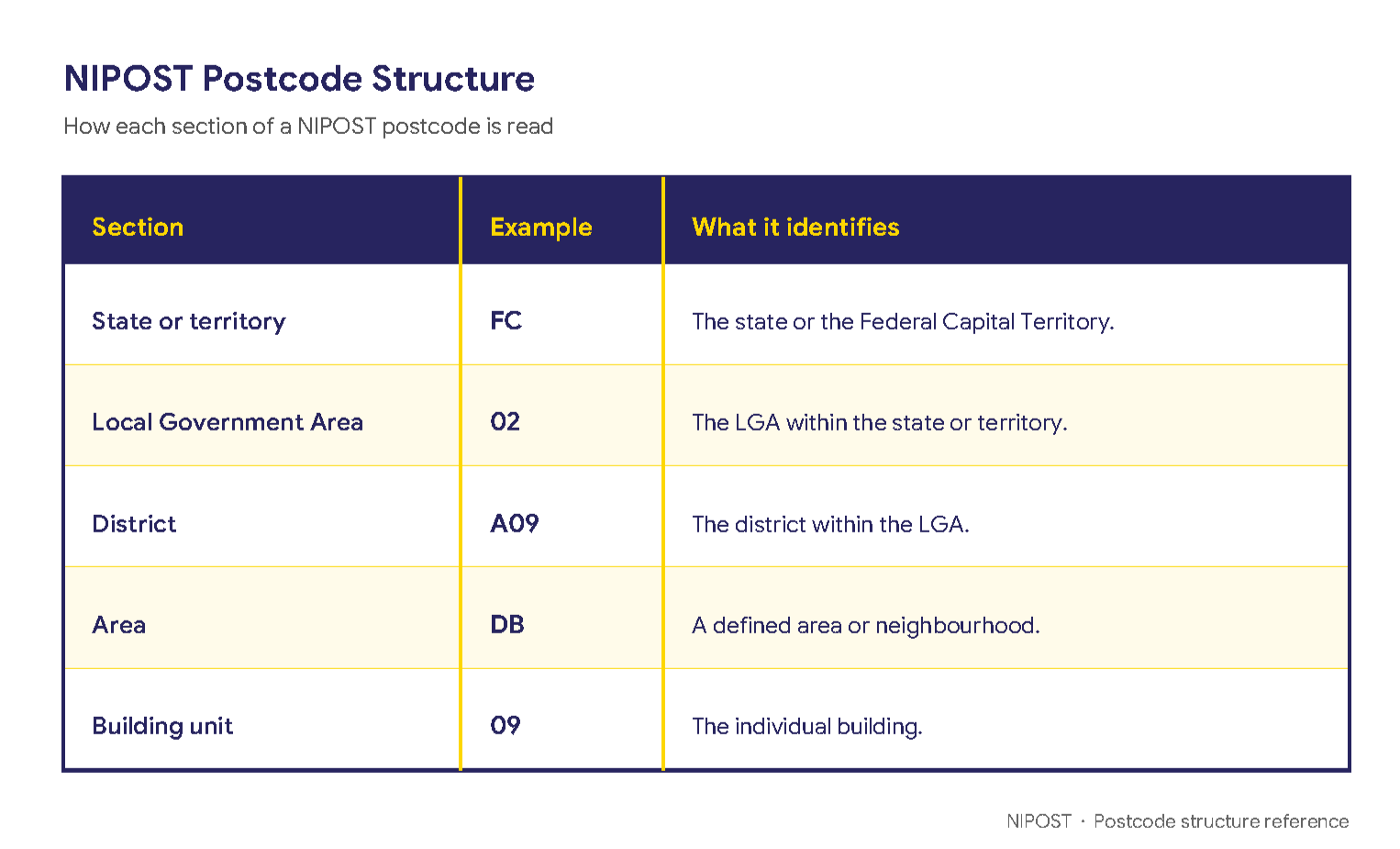
Nigeria is introducing a new alphanumeric postcode built to pinpoint individual buildings. A conventional six-digit postcode identifies a broad postal area. The new postcode combines letters and numbers to narrow a location from the state or territory down to a specific building.
A postcode may look like this:
FC 02 A09 DB 09
Each section represents a different geographical level.

Read from left to right, the code moves from the widest geographical area to the individual building. The new postcode gives people, businesses and public institutions a standard digital reference to find, share and verify buildings more accurately.
Nigeria's existing addressing system struggles to pin down individual buildings. A conventional postcode can cover a large area containing several streets and thousands of buildings. Even when a street name and house number are provided, a visitor may still need more directions like:
These directions work for people who already live in the area, but aren't very useful on delivery platforms, financial institutions, and government databases. The new postcode gives every mapped building a consistent location reference. Instead of identifying only a district or delivery area, it points users to the specific building they are trying to find.
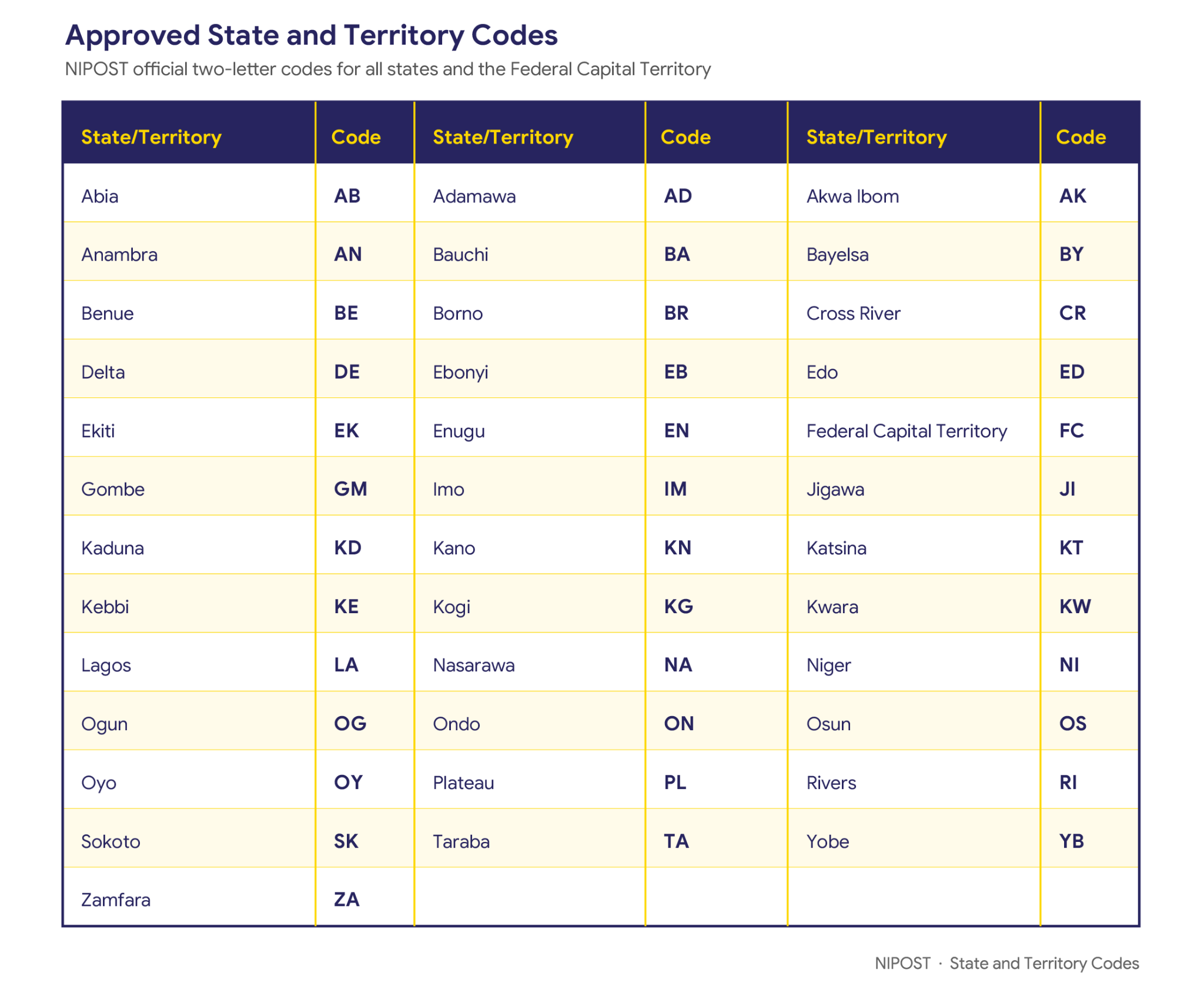
The first two characters of the postcode identify the state or the Federal Capital Territory.
For example, FC represents the Federal Capital Territory in the sample postcode FC 02 A09 DB 09.
Each state will have its own approved two-character code.

The state or territory code is only one part of the complete postcode. The remaining characters narrow the location down to the relevant LGA, district, area, and building.
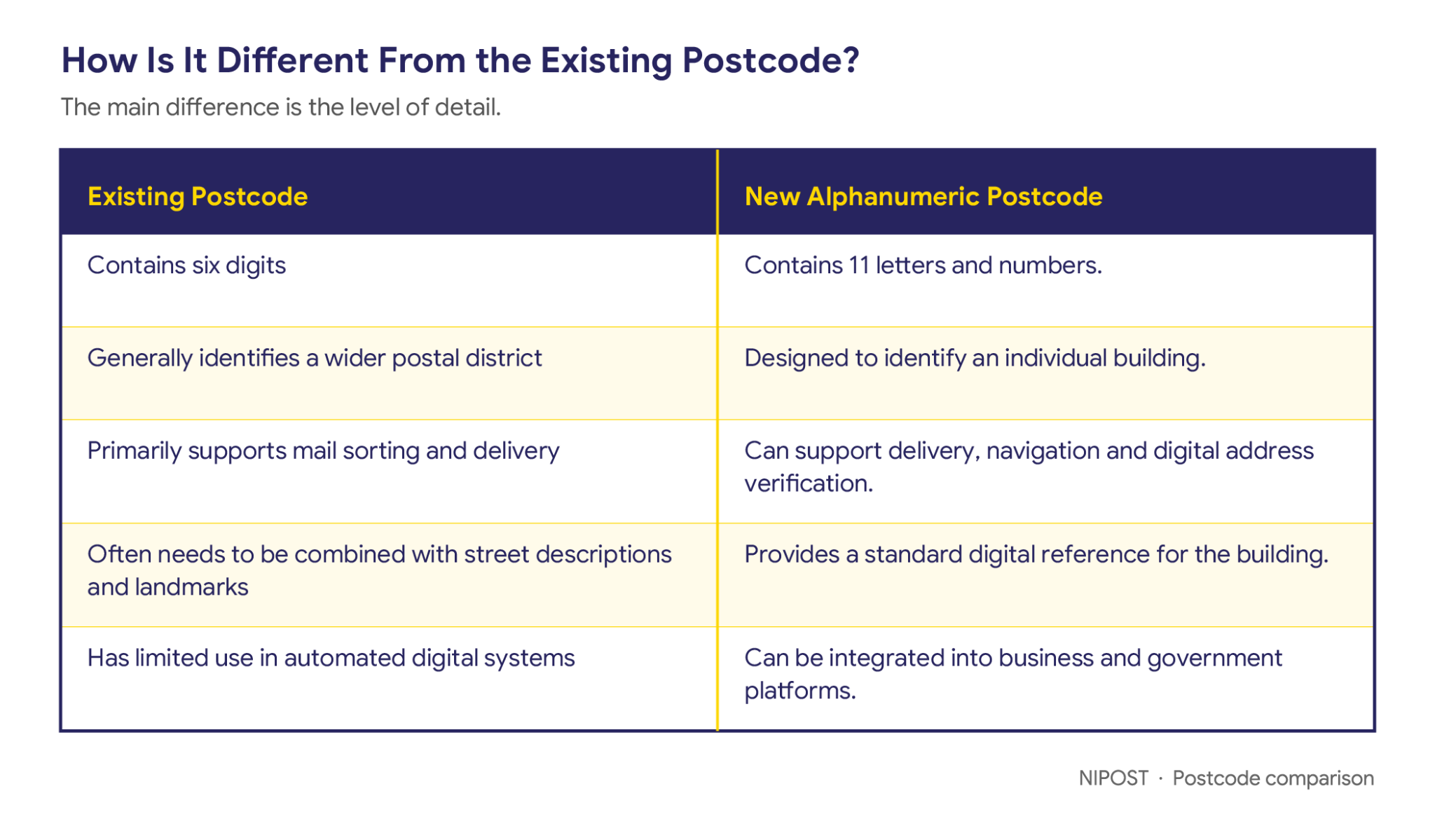
The main difference is the level of detail.

The new postcode works alongside familiar address information such as a street name, community or city, adding a precise digital reference that makes the address easier to locate and verify.
For example, a complete address could include:
Plot 15, Example Street, Wuse 2, AbujaPostcode: FC 02 A09 DB 09
The written address provides context, while the postcode points to the corresponding building.
From the official postcode app or web app, you can search for a building and view its assigned postcode. Depending on the available information, you may be able to find a postcode by:
Once you find the correct postcode, you can save or share it directly from the platform.
Always confirm that the building displayed on the map is the correct one before using or sharing its postcode.
If your building does not have a postcode, you can request one through the Nigerian Digital Postcode app. The request allows your building to be added to the postcode system so that it can receive an official postcode.
For a step-by-step guide on how to request a postcode for a building, read How to Get a Postcode for a Building That Does Not Have One.
Do not create or guess a postcode for your building. Use the official postcode platform to request and confirm the correct code.
Businesses and government institutions can integrate postcode services into relevant digital systems through approved integration tools.
Potential uses include:
Organisations interested in early integration can register their interest while the developer portal and business integration services are being finalised.
The postcode app and website are scheduled to launch on October 1, 2026.
The new alphanumeric postcode gives Nigerians a precise and consistent way to identify buildings. It reduces dependence on long directions, repeated phone calls, and informal landmarks by giving people and systems a digital code they can understand.
Delivery riders will no longer need directions like "beside the blue gate." When the platform launches, you can find your building’s postcode, save the postcodes of important places, and share accurate locations more easily. The postcode will point straight to the building you are looking for.

The Nigerian Postal Service (NIPOST) wishes to inform our esteemed customers of a recent policy change by the Government of the United States of America, enacted through the Executive Order on “Suspending Duty-Free De Minimis Treatment for All Countries” under the International Emergency Economic Powers Act (IEEPA).
This Executive Order applies to all postal operators and designated postal administrations worldwide. The payment of the additional duty affects all global postal inflows into the United States, not just those from Nigeria.
With effect from 29th August 2025, and in compliance with the Executive Order:
NIPOST is actively engaging with the Universal Postal Union (UPU), U.S. Customs and Border Protection (CBP), and our airline partners to minimize service disruptions and ensure a seamless customer experience.
We reassure our customers that NIPOST remains committed to providing safe, reliable, and efficient postal and courier services despite this global regulatory adjustment.
For enquiries, please contact:
customerservice@nipost.gov.ng
The Nigerian Postal Service (NIPOST) has advocated a wave of optimism and strategic direction following a two–day leadership workshop organized by the newly appointed Chairman of the NIPOST Governing Board, Isaacs Kekemeke. The event, held from April 14th to 15th at the Stratton Hotel, Asokoro, Abuja, brought together Top Management, General Managers of Commercial Business Units (CBUs), and State Postal Managers (SPMs) from across the country.
In his opening address, Hon. Kekemeke described NIPOST as a ‘’national heritage and critical infrastructure’’ that has drifted away from the consciousness of the younger generation. He emphasized the urgent need to rekindle public confidence by restoring its identity and relevance, especially among Nigeria’s youth.
“Change is not always easy. It unsettles the status quo, but the admired world we live in is the product of change,’’ the Chairman stated, adding that ‘’resistance to necessary change must itself be resisted.
He underscored the importance of technical knowledge and global best practices, referencing frameworks such as the Universal Postal Union’s Integrated Index for Postal Development (2IPD), and the four Rs of postal transformation: Reliability, Relevance, Reach, and Resilience.
Also speaking at the workshop, the Postmaster General of the Federation/CEO, NIPOST, Tola Odeyemi, reiterated the organization’s commitment to becoming one of Africa’s top three players in the e-commerce and logistics sector. Her remarks reinforced the tone of optimism set by the Board Chairman, emphasizing the organization’s readiness to evolve in line with global trends and expectations.